In-View Interactable Buttons
There are 5 buttons in total that can be used on screen:
Open the In-Game Menu (Figure 1)

Figure 1
Toggle the active state of the sidebar conversation (Figure 2)

Figure 2
Toggle the view to picture mode which shows a 2D panel of an open widget board on your screen (Figure 3)

Figure 3
Toggle the attention symbol above your avatar (Figure 4)

Figure 4
Toggle muting your microphone (Figure 5)

Figure 5
Open a larger set of emojis which, when pressed, appear above your avatar (Figure 6/7)

Figure 6
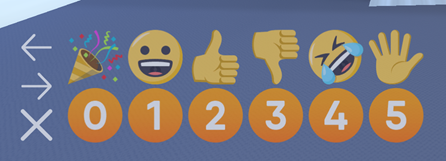
Figure 7: How the emotes look on Desktop
On the Quest, there are a few more buttons than the desktop (Figure 8)
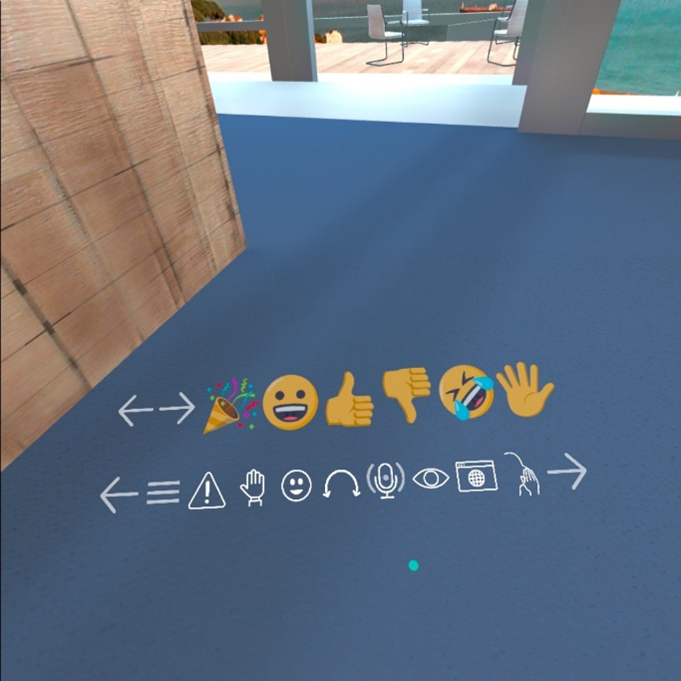
Figure 8
Displays a personal browser in front of you (Figure 9)

Figure 9
In view interactable buttons do not move according to your head position (Figure 9)
Figure 9
Changes hand to a lazer pointer that participants can see (Figure 10)
Figure 10